

I built ChHeader because a header editor has one job: change the headers I ask it to change. I do not want it adding ads to my browsing while holding access to my requests.
This isn’t a new complaint. In an October 2023 discussion, a user reported ads appearing on Google and Bing after enabling ModHeader, then disappearing when they disabled it. Another reported MaxAI ads in Google results. Those are contemporaneous user reports, not a test I ran against the current version.
I did not need to prove what the current version does before deciding the trust boundary was wrong for me. A tool I might give an authorization header to needs to stay focused on the job I installed it for.
ChHeader edits request and response headers in Chrome. Profiles stay in local storage. There’s no account, advertising, or analytics in the extension.
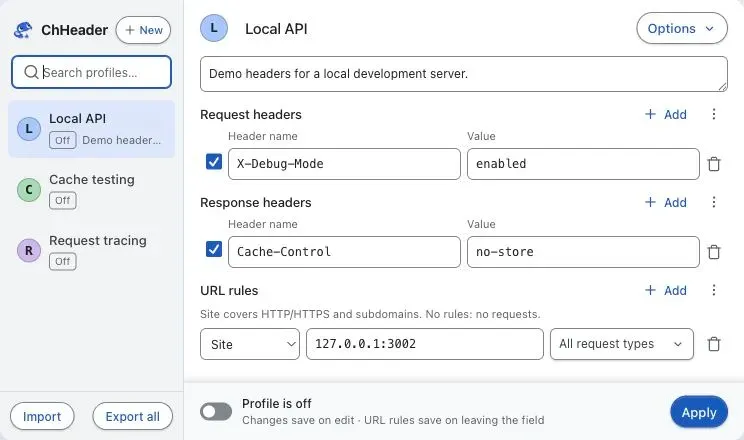
Header changes use Chrome’s declarativeNetRequest API: ChHeader saves rules, and Chrome applies them to matching requests. The extension does not need to read and rewrite page content to change a header.
Why I changed the permissions
Version 0.4.1 asked for access to every website. It made arbitrary development servers work without more prompts, but it was too much access for the job. Restricting a URL rule doesn’t reduce the permission Chrome has already granted.
In 0.4.2, I switched to optional website permissions. Installation grants no website access. You name the allowed sites, then approve them when turning a profile on. The broad HTTP/HTTPS patterns in the manifest let ChHeader ask for a host chosen later; they aren’t an automatic grant to the whole web.
The extension still needs storage for local profiles and declarativeNetRequestWithHostAccess for Chrome to apply header rules. It doesn’t need page scripts, a cookies API permission, or browsing-history access for this job.
There are two boundaries to keep straight. Chrome grants access to the extension. ChHeader also restricts each rule to the active profile’s allowed destinations. Grants saved from another profile don’t expand that list. Turning a profile off stops its rules, but doesn’t revoke its permissions. The popup’s Revoke all website access button does both.
The current setup can still be narrower. Entering a domain approves its subdomains, HTTP/HTTPS and all ports. For a page at app.example.com calling api.example.com, approve those two hosts rather than example.com. Use a URL pattern such as |https://api.example.com/v1/ to keep header changes on the HTTPS API. Cross-site requests need permission for the initiating page too; approving the API alone can leave requests unchanged.
I’d like exact hosts and HTTPS to be the default, with separate choices for subdomains and HTTP. Those controls aren’t implemented yet. The permission note explains the current behavior and a narrower setup you can use now.
Testing the permission boundary
I added a public header tester at headers.kahwee.com, with a second test domain for cross-site requests. The example profile changes only /headers/match. The other path and redirect give you something that should stay unchanged.
Use demo values there. Cloudflare receives the requests, even though the Worker displays only a few headers and omits credentials and cookies. It has no application logs or storage. The local fixture is the better place for secrets. Extension profiles themselves also have no additional encryption; the privacy policy explains storage and export limits.
Testing caught a useful failure: Chrome can reject a replacement rule while leaving the previous one active. Main now clears those old rules and turns profiles off when replacement fails. That fix is newer than the published 0.4.2 build.
The September 12 checks passed 445 extension tests, five Worker tests and six live endpoint tests. Actual Chrome tests showed the expected header changes and path restrictions on both custom domains. Some repeated requests also hit intermittent 403/client blocks. Reloading sometimes helped; the cause is still unresolved. The tester now labels failed requests inconclusive. A blocked request doesn’t prove the permission boundary worked.
The test record keeps those limits alongside the passes. Writing the tool myself doesn’t make it secure. It gives me code I can inspect and change when a test exposes a problem.
Building ChHeader did not make the trust problem disappear. It made the trust boundary mine to inspect. I can read the permissions, test the header rules, and change either when the evidence says they are too broad. If ChHeader suits you, use it or fork it. I would welcome another set of eyes on both.
Watch the 55-second demo to see request and response headers applied to a localhost test. It shows 0.4.1, before optional website permissions.
You can install ChHeader from the Chrome Web Store. Source and downloads are also available on GitHub.
Was this useful?
Thanks for the feedback.